
Description
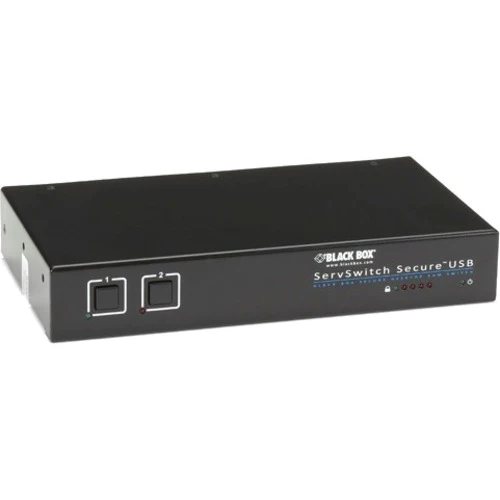
ServSwitch Secure KVM Switch with USB, EAL2+ EAL4+ Certified/TEMPEST Level I (Level A) Qualified, VGA, 2-Port
Quick Facts
- Get a high level of port-to-port electrical isolation, which facilitates data separation (RED/BLACK).
- Channel-to-channel 80-dB crosstalk isolation protects against signal snooping.
- Permanently hard wired, preventing access from one CPU or network to the others.
- Now listed on NIAP website.
Further Details
- The low radiated emissions profile meets the appropriate national requirements.
- External tamper-evident seals.
- Provides robust isolation between networks, so it’s ideal for government applications that access classified networks in addition to public networks such as the Internet.
- Constructed with a solid metal case and a long-wearing switching mechanism.
- USB host controller erases entire RAM to prevent residual data remaining on channel.
- Dedicated DDC bus and EDID memory emulation at each port.
- Clear, unmistakable channel selection.
- Non-Flash-upgradable ROM.
- To minimize electronic signaling, no common power supply.
The ServSwitch™ Secure KVM Switch with USB, EAL4+ Certified/TEMPEST Level I (Level A) Qualified, VGA, surpasses the security profiles of most other KVM switches.
In addition to its superior hardware-based data-isolation features, the switch has been certified for Common Criteria Evaluation Assurance to Level 4+ (EAL4+), augmented by ALC_FLR.2 and ATE_DPT.2.
The Common Criteria is an international standardized process for information technology security evaluation, validation, and certification. The Common Criteria scheme is supported by the National Security Agency through the National Information Assurance Program (NIAP). EAL4+ itself defines a common set of tests to evaluate the security of an IT product relating to its supply chain, from design and engineering to manufacturing and distribution.
- Switch between sources by using this KM Switchbox without degradation of performance and eliminate the manual work
- Connect up to 2 computers to 1 local users
- Features 1920 x 1280 resolution
- Establishes a rapid connection with USB devices






Related Products







Reviews
There are no reviews yet.